
Is one earbud not working while the other continues playing music? Whether your left earbud is not working, your right earbud has no sound, or your wireless earbuds only work on one side, the problem does not automatically mean your earbuds are damaged.
A low battery, dirty charging contacts, blocked speaker mesh, incorrect audio balance, or a Bluetooth pairing problem can cause one earbud to stop working.
Before buying replacement earbuds, try these troubleshooting steps.
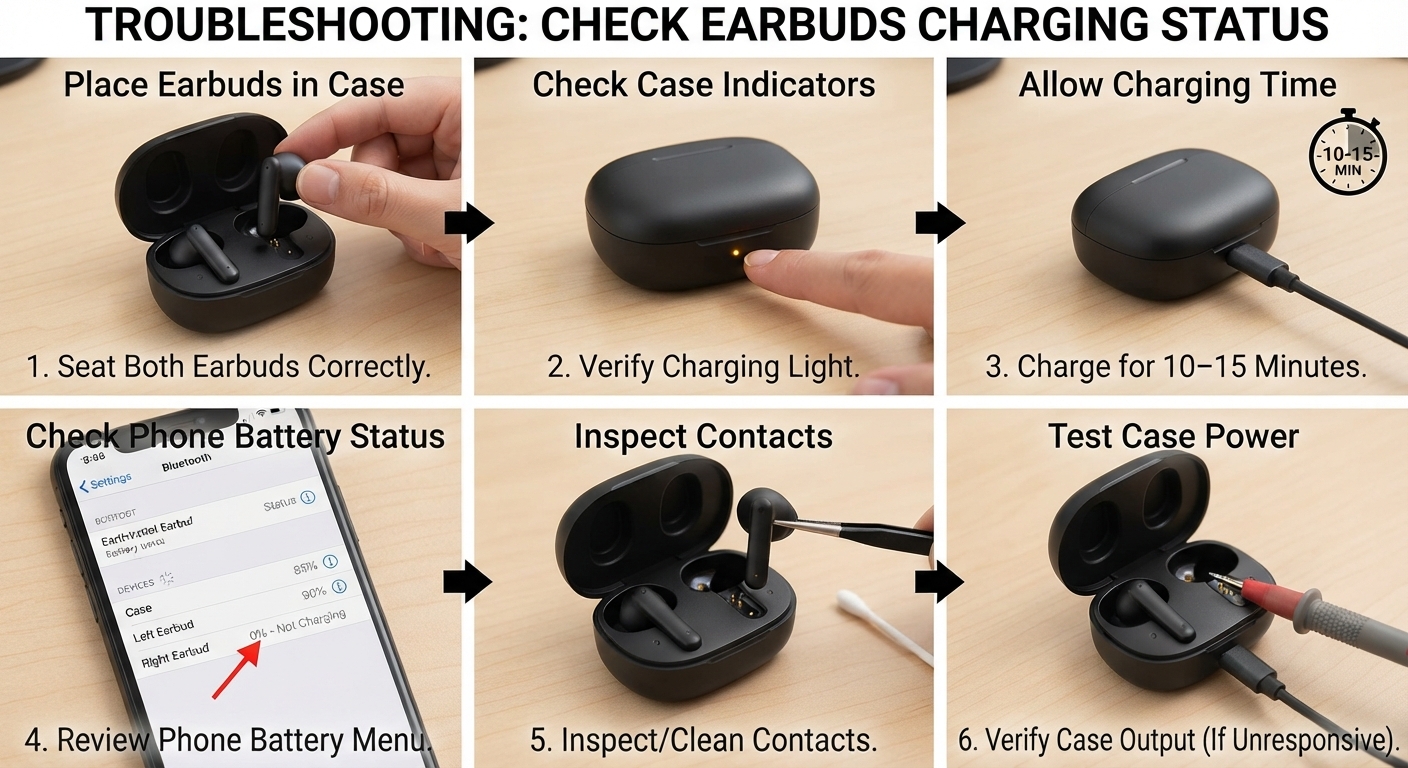
1. Check Whether Both Earbuds Are Charging
If one earbud is not charging in its case, it may eventually stop producing sound while the other continues working.
Try this:
Place both earbuds correctly inside the charging case.
Check whether the affected earbud's charging indicator responds, if your model has one.
Charge the case and earbuds for at least 10–15 minutes.
Check the battery levels in your phone's Bluetooth settings or the manufacturer's app, if supported.
If one earbud is not charging, inspect its metal charging contacts and the corresponding contacts inside the case. Dirt or poor contact can prevent charging.
Important: If the earbud remains completely unresponsive, test the case and cable before assuming the battery itself has failed.
For more model-specific checks, see Samsung's official guide to earbuds that do not charge or turn on or Xiaomi's troubleshooting guide for a single earbud that will not charge or turn on.
2. Clean the Earbud Speaker Mesh Safely
Sometimes one earbud has sound but is much quieter than the other. Earwax, dust, and debris can block the speaker mesh, reducing the volume or making the earbud appear silent.
Use a clean, dry, soft-bristled brush to gently remove visible debris from the speaker mesh. Wipe the exterior with a soft, dry cloth.
Do not push dirt deeper into the mesh, pour liquid into the speaker opening, or use needles and other sharp objects that could damage it. Follow the cleaning instructions for your specific model.
For AirPods, follow Apple's official cleaning instructions.
Recommended product
32-in-1 Electronics Cleaning Kit for Phone, Earbuds, Keyboard

Affiliate link
Check Price on Amazon3. Check Your Phone's Left and Right Audio Balance
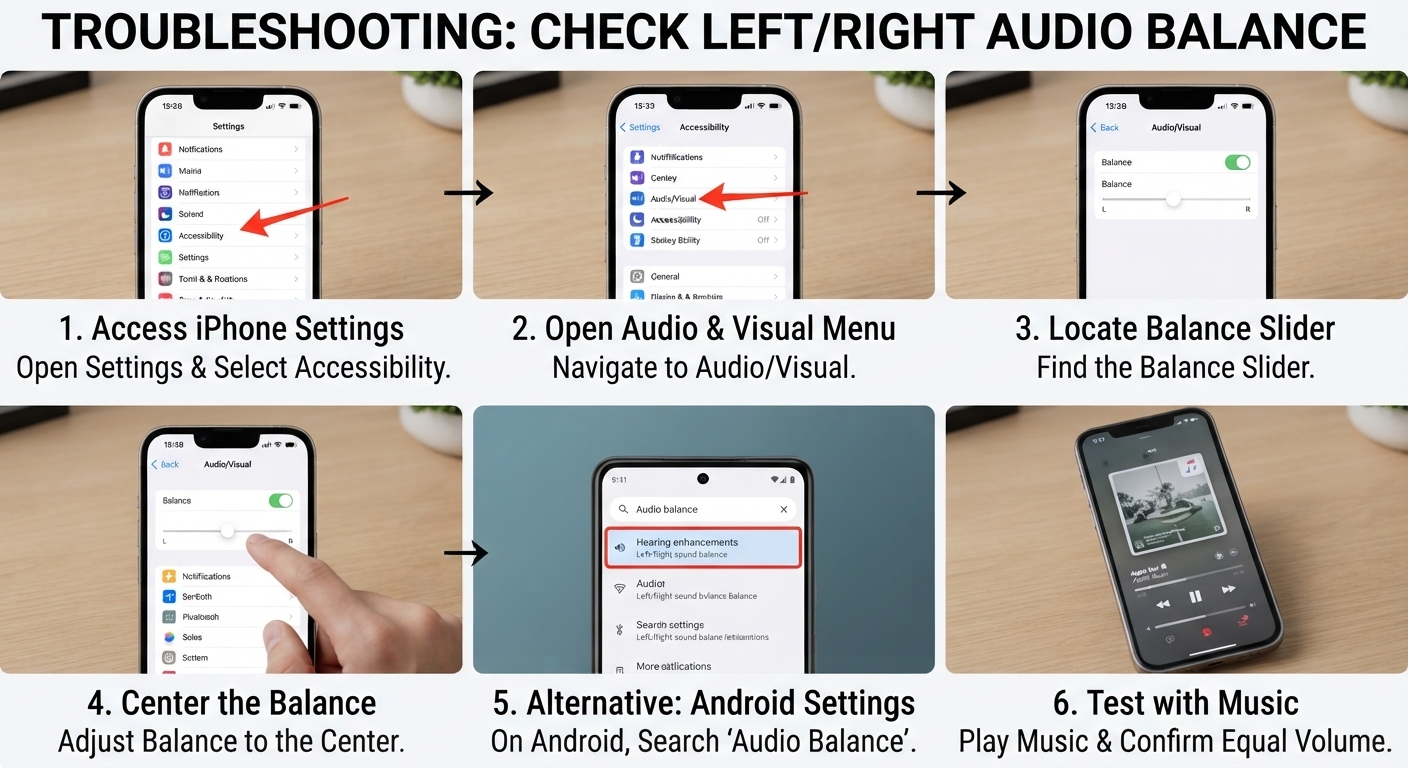
If one earbud is quieter than the other, your phone's audio balance settings may be responsible.
On an iPhone:
Open Settings.
Select Accessibility.
Open Audio & Visual.
Find the Balance slider and move it to the centre.
On Android, open Settings and search for audio balance, left/right sound balance, or hearing enhancements. The exact menu depends on the phone manufacturer and Android version.
Play music again and check whether both earbuds have equal volume.
If only one app has the problem, test another app before changing more settings.
For AirPods, Apple's guide to fixing one AirPod that is silent or quieter than the other covers both cleaning and audio balance. Galaxy Buds users can follow Samsung's official one-sided sound troubleshooting guide.
4. Disconnect and Reconnect Your Bluetooth Earbuds
If one earbud suddenly stops working, a temporary Bluetooth connection problem may be responsible.
Try the following:
Place both earbuds in their charging case.
Close the lid and wait several seconds, if your model supports this.
Remove both earbuds and allow them to reconnect.
If the problem continues, open your phone's Bluetooth settings.
Forget or unpair the earbuds, then pair them again using the manufacturer's instructions.
Some true wireless earbuds can lose their connection to each other, even when one still connects to your phone. Re-pairing may help, but the exact procedure differs between models.
For Xiaomi Buds, see Xiaomi's official guide to one earbud having no sound.
5. Reset the Earbuds to Factory Settings
If one earbud is still not working after charging and reconnecting, try resetting the earbuds.
Check the official instructions for your model before proceeding. Some earbuds reset through their charging case, others use touch controls, and some require a companion app.
A factory reset may erase pairing information and other saved settings. After resetting, pair the earbuds with your phone again and test both sides.
Do not assume that holding both earbuds for a fixed number of seconds will work on every brand.
AirPods: Follow Apple's official instructions for an AirPod that isn't working.
Samsung Galaxy Buds: Use Samsung's official troubleshooting guide.
Xiaomi Buds: Follow Xiaomi's model-specific reset instructions.
6. Test the Earbuds With Another Device
Still wondering why one wireless earbud is not working?
Connect the earbuds to another phone, tablet, or computer.
If both earbuds work on the second device, the original phone's audio settings, Bluetooth configuration, or software may be causing the problem.
If the same earbud remains silent on multiple devices, the issue is more likely to involve the earbud itself, its charging system, or its internal hardware.
This simple test can help you avoid replacing a perfectly functional pair of earbuds because of a phone setting.
7. Check for Physical Damage or Battery Failure
If one earbud stopped working after being dropped, exposed to moisture, or left unused for a long time, hardware damage may be involved.
Check for visible damage and unusual heat or swelling. Do not attempt to open the earbud or its lithium battery yourself.
If the earbud remains unresponsive after charging, cleaning, reconnecting, and resetting, consult the manufacturer's support service or a qualified repair technician.
Frequently Asked Questions
Why is my left earbud not working but my right one is?
The left earbud may have a low battery, poor charging contact, blocked speaker mesh, a connection issue, or hardware damage. Check charging and clean the speaker mesh before attempting a model-specific reset.
Why are my wireless earbuds only working on one side?
True wireless earbuds can lose their connection to each other, or one side may fail to charge. Check both battery levels, reconnect the pair, and reset them according to the manufacturer's instructions if necessary.
Can I fix one earbud that has no sound?
Often, yes. Charging problems, blocked speaker mesh, audio balance settings, and pairing issues can sometimes be fixed at home. If one earbud remains silent across multiple devices after troubleshooting, it may need professional repair or replacement.
Final Thoughts
If one earbud is not working, do not assume you need a new pair. Start by checking the charging case, cleaning the speaker mesh safely, checking audio balance, and reconnecting the earbuds.
If one side still has no sound after these checks and a proper reset, test the earbuds with another device before deciding whether repair or replacement is necessary.
Affiliate disclosure: TecniView may earn a commission from qualifying purchases made through affiliate links, at no additional cost to the reader.